Programatically change the column with…
Dim ts As DataGridTableStyle = New
DataGridTableStyle
ts.MappingName = "Vouchers"
DataGrid1.TableStyles.Clear()
DataGrid1.TableStyles.Add(ts)
DataGrid1.TableStyles("Vouchers").GridColumnStyles("VoucherNumber").Width
= 170
DataGrid1.TableStyles("Vouchers").GridColumnStyles("Comment").Width
= 400
----------------------------------------------------------------------------------------------------------------------------------------
KDN
Pretty DataGrid Combo,
Datetime, Checkbox Multiline Text, NumberPicker…
VB.Net DataGrid DataBinding:
All You’ll Ever Need
DataGrid
Setup With A ComboBox Column.
***This code does it
all*********************************************
Sub
SetupDataGrid()
DataGrid1.CaptionText =
"KnowledgeBase"
Dim ts As New
DataGridTableStyle()
ts.MappingName = "Reference"
ts.PreferredRowHeight = 50
ts.BackColor =
System.Drawing.Color.AliceBlue
ts.AlternatingBackColor =
System.Drawing.Color.LightSlateGray
DataGrid1.TableStyles.Add(ts)
Dim
ProjectName As New
DataGridTextBoxColumn()
ProjectName.MappingName = "Project_Name"
ProjectName.Width = 200
ProjectName.HeaderText = "Project
Name"
DataGrid1.TableStyles(0).GridColumnStyles.Add(ProjectName)
Dim
Key_Words As New
DataGridTextBoxColumn()
Key_Words.MappingName = "Key_Words"
Key_Words.Width = 200
Key_Words.HeaderText = "Key
Words"
DataGrid1.TableStyles(0).GridColumnStyles.Add(Key_Words)
Dim
Comments As New
DataGridTextBoxColumn()
Comments.MappingName =
"Comments"
Comments.Width = 490
Comments.HeaderText =
"Comments"
DataGrid1.TableStyles(0).GridColumnStyles.Add(Comments)
End Sub
*********************************************************
Private Sub DataGrid1_CurrentCellChanged(ByVal sender As Object, ByVal e As System.EventArgs) Handles
DataGrid1.CurrentCellChanged
MsgBox(DataGrid1.Item(DataGrid1.CurrentCell.RowNumber, 1))
Or…
Msgbox(Datagrid1.Item( datagrid1.currentrowindex,1))
End Sub
‘******** Another Snipit *********
Dim c As New DataGridCell()
c = DataGrid1.CurrentCell()
c.ColumnNumber = 0
DataGrid1.Item(c) = txtName.Text
‘********************************
'This will
programitcally move you to a particular cell in a datagrid...
DataGrid1.CurrentCell = New DataGridCell(4, 1)
'********************************************************
*********************************************************
Another Way to
iterate through the datagrid
Private Sub Button1_Click(ByVal
sender As System.Object, ByVal e As
System.EventArgs) Handles Button1.Click
Dim cm As CurrencyManager = CType(Me.BindingContext(Me.DataGrid1.DataSource),
CurrencyManager)
Dim
RowCount As Integer
= cm.Count
'assumes
datasource is a datatable...
Dim
ColCount As Integer
= CType(DataGrid1.DataSource,
DataTable).Columns.Count
Dim Row
As Integer
For Row
= 0 To RowCount - 1
Dim
For
'This method will
perserve the datatype of the value in the DataGrid's Cell...
Dim
cellValue As Object
= DataGrid1(Row,
MessageBox.Show((cellValue.ToString() + " "))
'Like
this way better....
Dim str
As String
str = DataGrid1(Row,
MessageBox.Show(str)
Next
Next
Row
End Sub
*********************************************************
Private Sub DataGrid1_CurrentCellChanged(ByVal sender As Object, ByVal e As System.EventArgs) Handles
DataGrid1.CurrentCellChanged
'This will
tell you what row and column you just clicked inside of...
MsgBox(DataGrid1.CurrentCell.ToString)
'This will tell you the value in the cell you just clicked
inside of...
MsgBox(DataGrid1.Item(DataGrid1.CurrentCell))
End Sub
Private Sub DataGrid1_CurrentCellChanged(ByVal sender As Object, ByVal e As System.EventArgs) Handles
DataGrid1.CurrentCellChanged
‘This will tell you the value of cell 0
in row i
Dim i As Integer =
DataGrid1.CurrentRowIndex
txtName.Text = DataGrid1.Item(i, 0)
End Sub
Other Ways…
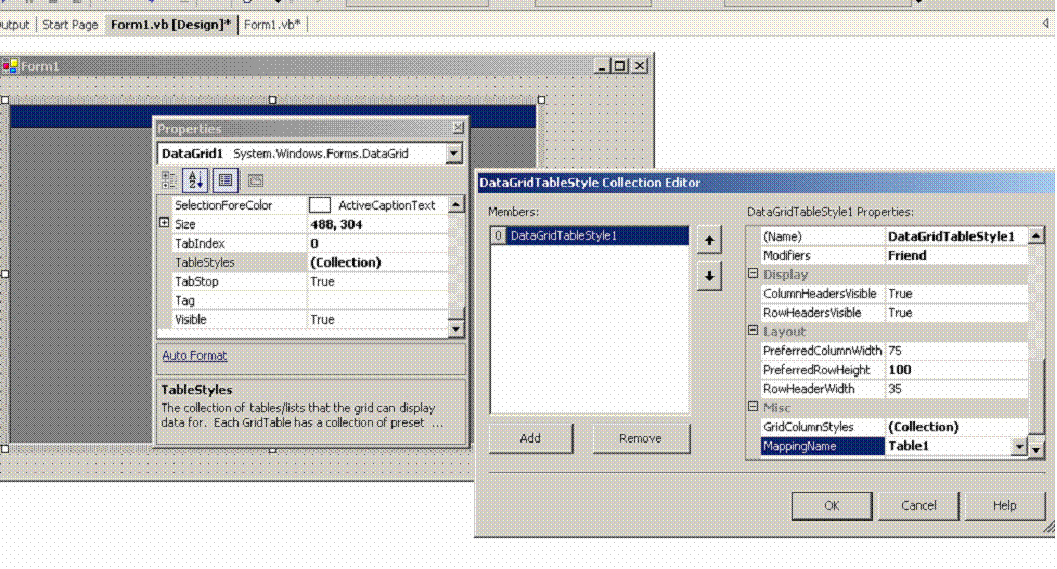
The image above shows the important properties of the vb.net datagrid. From the properties menu, select the TableStyles Collection and add a new collection, DataGridTableStyle1, as shown above. The MappingName, Table1, refers to the objDs.tables(“Table1”) that the DataGrid will be bound to with the command:
Private Sub Form1_Load(ByVal sender As
System.Object, ByVal e As System.EventArgs) Handles MyBase.Load
'objDs & objDaTable1 can be placed
in a Global Area
Dim objDs As New DataSet()
Dim objDaTable1 As New
OleDb.OleDbDataAdapter()
Dim objConn = New
System.Data.OleDb.OleDbConnection("provider=Microsoft.Jet.OLEDB.4.0;Data
Source=c:\db1.mdb")
Dim objCommand As New
OleDb.OleDbCommand()
objCommand = New OleDbCommand("Select
* From Table1", objConn)
objDaTable1.SelectCommand = objCommand
objDaTable1.Fill(objDS,
"Table1")
Dim objCommandBuilder As New
OleDbCommandBuilder(objDaTable1)
DataGrid1.DataSource =
objDs.Tables("Table1")
DataGrid1.SetDataBinding(objDs, "Table1")
End Sub
Private Sub Button1_Click(ByVal sender As
System.Object, ByVal e As System.EventArgs) Handles Button1.Click
objDaTable1.Update(objDs.Tables("Table1"))
End Sub
Notice the DataGrid1.DataSource =
objDs.Tables(“Table1”) and DataGrid1.SetDataBinding(objDs,”Table1”).
The “PreferredRowHeight” property
is used to set the DataGrid’s Row Height.
Notice the format of the
DataGrid1.SetDataBinding(objDs,”Table1”) command. objDs ,
“Table1”… NOT
objDs.tables(“Table1”)
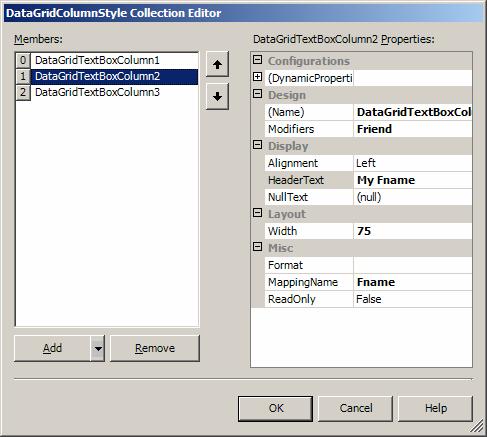
The above image depicts the
DataGridColumnStyle Collection. Notice
there is a member for each datafield we want displayed on the grid. Also notice that the MappingName corresponds
to the Table’s Field Name.
When you click on a cell, this
event will display the cell’s text….
Private Sub
DataGrid1_CurrentCellChanged(ByVal sender As Object, ByVal e As
System.EventArgs) Handles
DataGrid1.CurrentCellChanged
MsgBox(DataGrid1.Item(DataGrid1.CurrentCell))
End Sub
‘********** How
to add a ComboBox To A VB.Net DataGrid *****************************
If
DataGrid1.CurrentCell.ColumnNumber = 2 Then 'Column 0 clicked
Dim cb As New
System.Drawing.Rectangle() 'cell bounds
cb =
DataGrid1.GetCellBounds(DataGrid1.CurrentRowIndex, 2) 'cell
bounds
ComboBox1.Location = New Point(cb.X, cb.Y) 'Location
for month control
DataGrid1.Controls.Add(ComboBox1) 'Add the month control
ComboBox1.Width = cb.Width
ComboBox1.BringToFront()
ComboBox1.Show() 'Show
the control
End If
‘***********************************************************************************************