Step 1
Create a Data Access Layer Class that will handle the Get, Update, Delete and Insert. Below is a Class, “MyDataAccessLayerClass”, that does just that.
Public Class MyDataAccessLayerClass
Dim Connstring As String = ConfigurationManager.ConnectionStrings("SMTBankConnectionString").ConnectionString
Public Function GetSomeData() As DataSet
Dim cs As String = ConfigurationManager.ConnectionStrings("SMTBankConnectionString").ConnectionString
Dim objConn As New SqlConnection(cs)
Dim objCommand As New SqlCommand
Dim objDa As New SqlDataAdapter
Dim objDs As New DataSet
Dim objCommandBuilder As New SqlCommandBuilder
objCommand.CommandText = "Select id_reference,[Reference] From [References]"
objCommand.Connection = objConn
objDa.SelectCommand = objCommand
objDa.Fill(objDs, "Table1")
Return objDs
End Function
Public Sub UpdateSomeData(ByVal Reference, ByVal Id_reference)
Dim cs As String = ConfigurationManager.ConnectionStrings("SMTBankConnectionString").ConnectionString
Dim objConn As New SqlConnection(cs)
Dim objcommand As New SqlCommand
Dim QStr As String
QStr = "UPDATE [References] SET "
QStr = QStr & "[Reference] = '" & Reference & "'"
QStr = QStr & " WHERE id_reference = " & Id_reference
objcommand = New SqlCommand(QStr, objConn)
objConn.Open()
objcommand.ExecuteNonQuery()
objConn.Close()
End Sub
Public Sub DeleteSomeData(ByVal id_reference)
'!!!!!!!!!!!!!!!!!!!!!!
'Important!!!!!!!!!!!!!
'!!!!!!!!!!!!!!!!!!!!!!!!!!!!!!!!!!!!!!!!!!!!!!!!!!!!!!!!!!!!!!!!!!!!!!!!!!!!!!!!!!!!!!!!
' The DataKeyName Property of the Gridview control must be set to id_reference!!!!
'!!!!!!!!!!!!!!!!!!!!!!!!!!!!!!!!!!!!!!!!!!!!!!!!!!!!!!!!!!!!!!!!!!!!!!!!!!!!!!!!!!!!!!!!
'!!!!!!!!!!!!!!!!!!!!!!!!!!!!!!!!!!!!!!!!!!!!!!!!!!!!!!!!!!!!!!!!!!!!!!!!!!!!!!!!!!!!!!!!
Dim cs As String = ConfigurationManager.ConnectionStrings("SMTBankConnectionString").ConnectionString
Dim objConn As New SqlConnection(cs)
Dim objcommand As New SqlCommand
Dim QStr As String
QStr = "Delete From [References] where id_reference = " & id_reference
objcommand = New SqlCommand(QStr, objConn)
objConn.Open()
objcommand.ExecuteNonQuery()
objConn.Close()
End Sub
Public Sub InsertSomeData(ByVal Reference, ByVal id_bank)
Dim cs As String = ConfigurationManager.ConnectionStrings("SMTBankConnectionString").ConnectionString
Dim objConn As New SqlConnection(cs)
objConn.Open()
Dim objCommand As New SqlCommand
Dim v1 As String = "'" & Reference & "'"
Dim v2 As String = id_bank
'WebForm Fields....
Dim strValues As String = v1 & "," & v2
'Database Fields...
Dim strFields As String = "[Reference],Id_bank"
objCommand = New SqlCommand("INSERT INTO [References] (" & strFields & ") VALUES (" & strValues & ")", objConn)
objCommand.ExecuteNonQuery()
objCommand.Dispose()
objCommand = Nothing
objConn.Close()
End Sub
End Class
Step 2
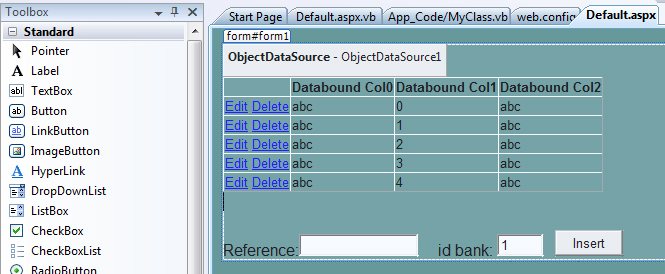
On the webform, drop a DataGridView and ObjectDataSource Control…
The DataKeyName Property of the Gridview control should be set to the
DataSet’s id key field.
Step 3
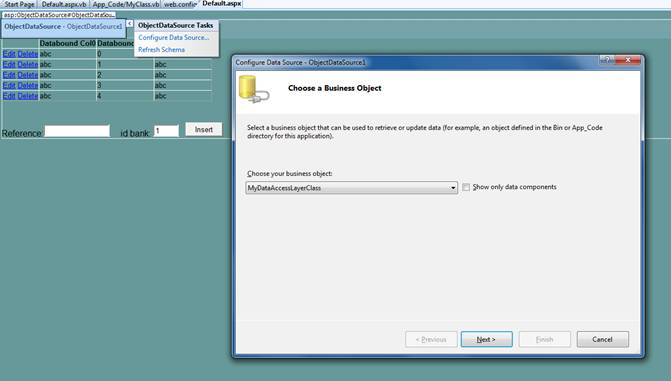
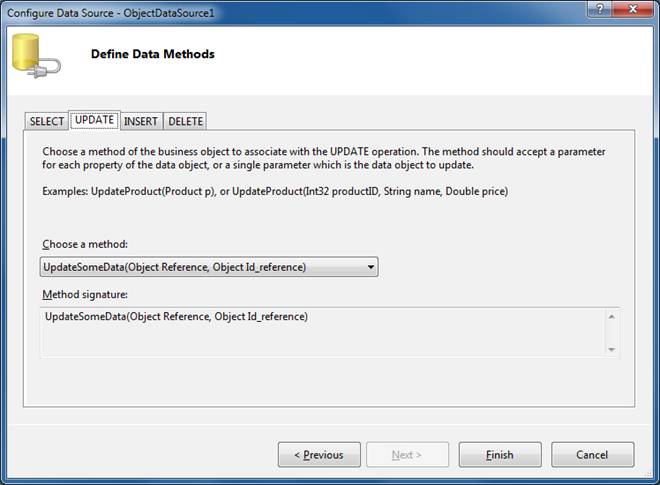
Configure the ObjectDataSource for Update, Insert, Select and Delete…
Step 4
Add some code to do the insert….
This code actually has nothing to do with the DataGridView
Protected Sub cmdInsert_Click(ByVal
sender As Object,
ByVal e As
System.EventArgs) Handles cmdInsert.Click
'Insert a
record and refresh the DataGridView
Dim o As New
MyDataAccessLayerClass
o.InsertSomeData(txtReference.Text,
txtIDBank.Text)
'Refresh the
DataGridView
Me.DataBind()
End Sub
Step 5
Don’t forget to hide the id fields…
Protected Sub GridView1_RowCreated(ByVal
sender As Object,
ByVal e As System.Web.UI.WebControls.GridViewRowEventArgs)
Handles GridView1.RowCreated
'Maketh
id_reference column invisible...
'Why this
works? Because the event is called after the data is bound to the grid... This
ensures that the column has been databound and then it is hidden.
e.Row.Cells(1).Visible = False 'id_reference
End Sub